
uWSGI + Django Stability CPU Jitter Troubleshooting Record
Problem Phenomenon
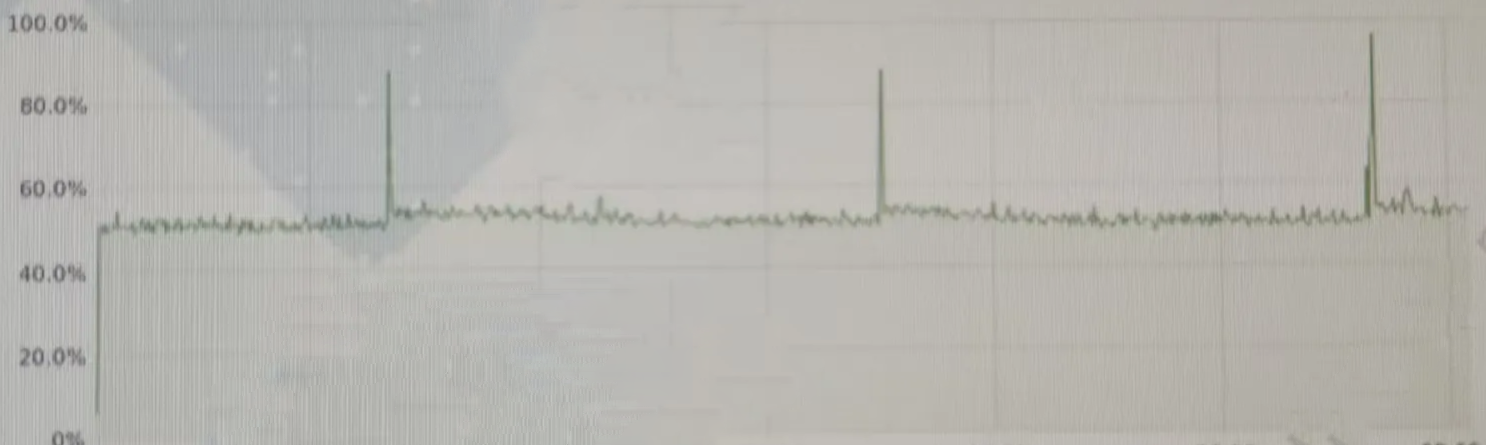
In a stability test, a Django application published using uWSGI showed periodic CPU jitter. From the monitoring chart, it can be seen that a significant CPU usage peak occurs approximately every 4 hours, accompanied by a drop in memory usage:
Preliminary Analysis: Attribution to GC Misconception
First Instinct: Garbage Collection (GC)
- Observation: Memory drops when CPU peaks, looking like GC triggering.
- Time Pattern: Every ~4 hours, showing strong periodicity.
- Troubleshooting Direction: Check for scheduled GC (none found).
Suspicion Direction: All Workers GC Simultaneously
Through research, it was found that uWSGI’s pre-fork mode might lead to:
- All workers share the same GC configuration.
- Because request processing rhythms are similar, GC is triggered synchronously.
- Massive simultaneous GC → CPU spike.
Implementation and Verification
Attempt 1: Randomize GC Threshold
import random
import gc
from uwsgidecorators import postfork

@postfork
def randomize_gc_threshold():
    """Set different GC thresholds for each worker to avoid simultaneous GC"""
    gc.set_threshold(
        random.randint(700, 900),  # generation 0
        random.randint(8, 12),     # generation 1
        random.randint(8, 12)      # generation 2
    )
Result: CPU jitter did not improve.
Attempt 2: Dedicated GC Thread
The original plan was to create an independent thread to execute periodic GC, but further research revealed a key clue…
Key Breakthrough: Re-examining uWSGI Configuration
Multiple sources recommended the following configuration:
max-requests = 5000
max-requests-delta = 300
However, the actual project configuration was:
max-requests = 50000 # Restart worker after processing 50000 requests
Calculation Verification
Based on the test environment TPS (about 3.5 req/s):
Restart Interval = 50000 / 3 ≈ 16666.7 seconds ≈ 4.6 hours
Perfectly matches the ~4 hour CPU peak in the monitoring chart!
The CPU jitter was not GC at all, but the worker restart cycle.
The Truth: Periodic Worker Restart Causes CPU Peaks
Mechanism
- Worker triggers graceful restart after processing
max-requestscount. - During restart:
- Release Python interpreter memory.
- Reload Django application.
- Rebuild connection pool.
- Re-import modules.
Reason for Memory Drop
Not GC, but:
- Old worker exits.
- OS completely reclaims the process memory.
- New worker starts and reallocates memory.
Optimization Suggestions
Having found the problem point, solving it is straightforward. According to suggestions from AI, if we disperse the restart points, this CPU spike should improve. So I adjusted and tested.
Adjust Restart Strategy (Currently Adopted)
max-requests = 10000
max-requests-delta = 300
Advantages:
- Avoid excessive restart costs caused by accumulating a lot of state in a single worker.
- Random offset avoids simultaneous restarts.
- CPU and memory curves are smoother.
Memory-based Restart Trigger
reload-on-rss = 512  # Restart if RSS > 512MB
reload-on-as = 768   # Restart if Virtual Space > 768MB
Reoccurring Issue
After testing, no obvious “random effect” was seen. I began to suspect whether max-requests-delta was supported.
Verification execution:
uwsgi --help | grep max-requests-delta
Parameter not found.
Further Search
uwsgi --help | grep delta
Output:
--max-worker-lifetime-delta add (worker_id * delta) seconds to the max_worker_lifetime value of each worker
This indicates that the current version only supports:
--max-worker-lifetime-delta
And this mechanism is linear offset by worker_id, not random offset.
Summary of Lessons Learned
Troubleshooting Misconception Reflection
- Phenomenon Attribution Bias
- Memory drop ≠ GC
- Periodicity ≠ Scheduled Task
- Must consider all relevant mechanisms
- Configuration Neglect
- Over-focus on code
- Ignore runtime configuration
- Middleware lifecycle management has far-reaching effects
- AI Answers Need Verification
- Cross-check multiple models
- Check official documentation
- Version differences are critical
Configuration Audit Checklist
Key uWSGI configurations:
max-requestsmax-worker-lifetimereload-on-rssharakirienable-metrics
Follow-up
The restart mechanism of uWSGI is the root cause of CPU jitter, but the place where CPU usage is truly high is the Django application loading process. Future work can further reduce the number of workers or optimize Django startup speed.
Core Takeaways
- Infrastructure configuration is as important as code quality.
- Understanding middleware lifecycle is key to troubleshooting.
- Establish a systematic troubleshooting mental model.
- Monitoring combined with logs provides a complete perspective.
This troubleshooting reminds us: in complex systems, seemingly obvious reasons are often illusions. True tuning comes from understanding the operating mechanism of every layer of components, not just staying at the surface.